Export a Document#
MarkText allows you to export a markdown document as PDF and HTML file or to print the document.
Options
Page options
PDF and print exports provide page size, orientation and margin controls. HTML export instead provides a page-title field.
Style
Adjust the page style without modify the page theme:
- Overwrite font family, size and line height.
- Auto numbering headings.
- Option to show the front matter on the exported document.
Theme
MarkText allows you to select a page theme before exporting. You can learn more about page themes here.
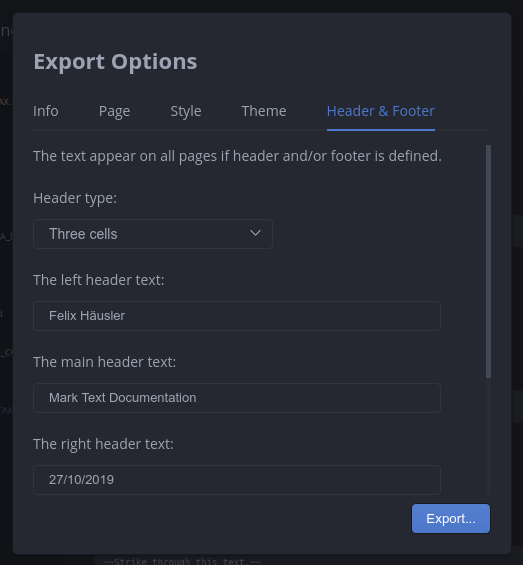
Header and footer
You can include a header and/or footer in the exported document if you choose PDF or printing and also adjust the header/footer style. You can select between no, a single or a three cell header in export options. The header is repeated through the export page layout; the footer is fixed at the bottom. Footer cells are constrained to one line. The settings do not expose a page-number field. An example can be seen below.

Markdown extensions and media
The HTML/PDF renderer reads the document's math, footnote, superscript/subscript, highlight, inline-diff, multiline-blockquote and GitHub Alerts options. For example, enable GitHub Alerts in Preferences → Markdown to render alert blocks with their associated styling (since 0.22.0). Folded headings still export their full section contents.
Exporting a diagram as PNG or SVG is a separate action in the media viewer, rather than a whole-document export format.